
Download Winamp – Classic Media Player Reimagined for Modern Streaming
Introduction: Why Winamp Still Matters in 2025
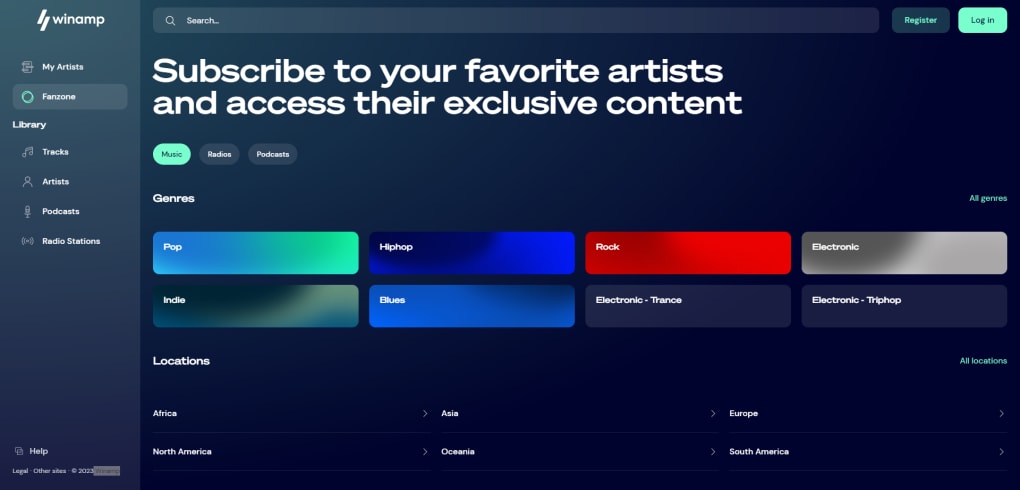
Since its debut in the late 1990s, Winamp has become a cultural icon, renowned for its lightning‑fast playback, skinable interface, and legendary graphic equalizer. The latest incarnation brings that beloved experience to the web, transforming the classic desktop player into a freemium multimedia web app that bridges the gap between creators and fans. Unlike mainstream platforms such as Spotify or YouTube Music, Winamp’s “Fanzone” model lets artists design tiered subscription plans, sell singles, albums, podcasts, radio shows, and even future NFT releases directly to listeners. This creator‑centric approach, combined with cross‑platform availability for Windows, macOS, Android, and iOS, makes Winamp a compelling alternative for both music lovers and independent artists seeking a single hub for distribution and fan engagement.
The platform retains the signature equalizer that gave Winamp its visual identity, letting users tweak frequencies in real time while streaming any audio format. In addition, a curated list of global radio stations and a powerful playlist engine ensure that even legacy fans feel at home. Whether you’re an up‑and‑coming musician looking to monetize your catalog, a podcaster hunting a flexible payout model, or a casual listener craving a nostalgic interface, Winamp promises a secure, free‑to‑start experience that can be upgraded with premium features as your needs evolve.
Overview, Core Features & Compatibility
Key Features That Define Winamp 2025
- Fanzone creator hub with tiered subscription plans per artist.
- Iconic graphic equalizer with customizable presets and real‑time frequency sliders.
- Support for singles, albums, podcasts, radio programs, and future NFT transactions.
- Cross‑platform web app with native clients for Windows, macOS, Android, and iOS.
- Integrated playlist editor, drag‑and‑drop skin support, and smart queue management.
- Thousands of worldwide radio stations searchable by genre, location, or language.
- Secure, freemium model – free basic listening, optional premium tiers for ad‑free experience and higher audio quality.
- Analytics dashboard for creators: stream counts, revenue breakdown, and fan demographics.
Operating System Compatibility
Winamp’s web‑based architecture guarantees that any modern browser on Windows 10/11, macOS Ventura or later, Chrome OS, Android 9+, and iOS 14+ can access the full feature set without additional downloads. Dedicated native apps are also available for Windows (Winamp‑Desktop.exe) and macOS (Winamp‑Desktop.dmg), delivering deeper system integration, hardware‑accelerated audio decoding, and offline playback capabilities for premium subscribers.
How Winamp Positions Itself in the Streaming Landscape
While major streaming services rely on a single, blanket subscription that unlocks an enormous catalog, Winamp opts for a creator‑first ecosystem. Each artist sets their own pricing, from micro‑tiers granting early‑access demos to premium bundles that include exclusive merch or NFT drops. This model empowers musicians to retain a larger share of revenue and cultivate direct relationships with fans, while listeners enjoy a more personalized catalog that reflects their true musical tastes rather than algorithmic recommendations.
Installation, Setup & Everyday Usage
Getting Started – Web App vs. Native Clients
For most users, the fastest way to dive into Winamp is via the web app at winamp.com. No installation is required; simply navigate to the site, create a free account using an email address or social login, and you’ll be greeted by the classic Winamp skin with the modern Fanzone toolbar at the top. If you prefer deeper system integration, download the native client:
- Windows: Click “Download for Windows,” run the
Winamp‑Desktop.exeinstaller, and follow the on‑screen prompts. The installer will automatically add a shortcut to the Start menu and register Winamp as the default audio player if you choose. - macOS: Download
Winamp‑Desktop.dmg, open the disk image, and drag the Winamp icon to the Applications folder. macOS will ask for permission to access your Music folder – grant it to enable local library imports. - Android & iOS: Search “Winamp” in Google Play or the Apple App Store, tap “Install,” and launch the app once the download completes.
First‑Time Configuration
Upon launching the app, you’ll be prompted to personalize your experience:
- Choose a skin: Classic “Winamp Classic,” “Neon,” or community‑created themes.
- Set up the equalizer: Select a preset (Rock, Jazz, Bass Boost) or manually adjust the sliders. The changes are saved per device and synced to your cloud profile.
- Connect your library: Import local MP3, FLAC, or WAV files, or link external cloud storage (Google Drive, Dropbox) for seamless playback.
Daily Workflow for Listeners and Creators
Listeners can browse the Fanzone marketplace, subscribe to individual artist tiers, and instantly add tracks to custom playlists. The built‑in “Smart Queue” suggests songs from the same tier or similar genre, while the equalizer lets you fine‑tune each listening session.
Creators log into their “Studio” dashboard, upload new releases, set pricing tiers, and schedule NFT drops. The analytics panel offers real‑time insights: stream counts, revenue per tier, and fan engagement metrics. Once a track is live, fans receive push notifications and can share directly to social platforms, driving organic growth without leaving Winamp.
Pros, Cons & Frequently Asked Questions
Pros
- Creator‑centric subscription model encourages direct fan support.
- Iconic graphic equalizer and skinable interface retain nostalgic appeal.
- Cross‑platform support ensures consistent experience on desktop and mobile.
- Free tier provides ad‑supported listening with easy upgrade path.
- Future‑ready with planned NFT integration and robust analytics for artists.
Cons
- Library size limited by individual artist tiers – not a single‑pay‑all catalog.
- Some advanced features (offline playback, high‑resolution audio) require premium subscription.
- Initial learning curve for creators unfamiliar with tiered pricing.
- Radio station selection, while extensive, can feel less curated than dedicated radio apps.
FAQ – Your Winamp Questions Answered
Is Winamp completely free or do I need to pay for a subscription?
Winamp offers a free tier that includes ad‑supported streaming, access to the classic equalizer, and basic playlist creation. Premium subscriptions unlock ad‑free listening, higher audio quality (up to 320 kbps), offline playback, and exclusive creator content. The pricing varies per artist tier, so you only pay for the creators you follow.
Can I import my existing music library into Winamp?
Yes. Both the web app and native clients let you import local files (MP3, FLAC, WAV, AAC) from your computer or mobile device. You can also link cloud storage services such as Google Drive, Dropbox, or OneDrive to stream your personal collection alongside the online catalog.
How does the creator‑tier pricing work?
Each artist sets up multiple subscription tiers within the Fanzone. A basic tier might grant access to new singles and a community chat, while higher tiers can include album drops, exclusive livestreams, merch bundles, or future NFT releases. Prices are defined by the creator, and Winamp takes a small platform fee before passing earnings to the artist.
Is Winamp available offline?
Offline playback is a premium feature available on the native Windows, macOS, Android, and iOS apps. After subscribing to a creator’s tier, you can download individual tracks or full albums for offline listening, which syncs across all your devices.
Will my data be safe on Winamp?
Winamp employs industry‑standard encryption (TLS 1.3) for all data transmission and stores passwords using salted bcrypt hashes. The platform is GDPR‑compliant, giving users full control over personal data, with options to export or delete account information at any time.
Conclusion: Is Winamp the Right Choice for You?
Winamp has successfully transformed a nostalgic desktop player into a modern, creator‑focused streaming ecosystem. Its blend of classic features—like the iconic equalizer and skinable UI—with innovative tools such as the Fanzone tiered subscriptions, analytics dashboard, and upcoming NFT support makes it a unique proposition for both listeners and independent artists. If you value direct artist interaction, flexible pricing, and a familiar interface that lets you fine‑tune your sound, Winamp stands out as a compelling alternative to the monolithic services dominating the market today.
For casual listeners who simply want an all‑in‑one music library, traditional platforms may still offer a broader catalog under a single fee. However, for fans eager to support their favorite creators directly, discover emerging talent, and enjoy a truly customizable audio experience, Winamp delivers a secure, free‑to‑start environment that grows with you. Ready to explore the next generation of music streaming? Download Winamp now and start building your personalized soundscape today.
Winamp offers a refreshing blend of nostalgia and modern creator tools. The tiered subscription model empowers artists, while the classic equalizer satisfies audiophiles. Minor drawbacks include a learning curve for new creators and the need for a premium plan for offline listening, but overall it’s a robust platform for music lovers seeking deeper engagement.



.png)



